Data & Cloud Vast Help Center
Need help with your Vast service? Find your specific Vast Business service below to begin.
Have questions about our fiber network?
Call now to speak to a member of our customer service staff.
1-866-991-9722
Speed Test
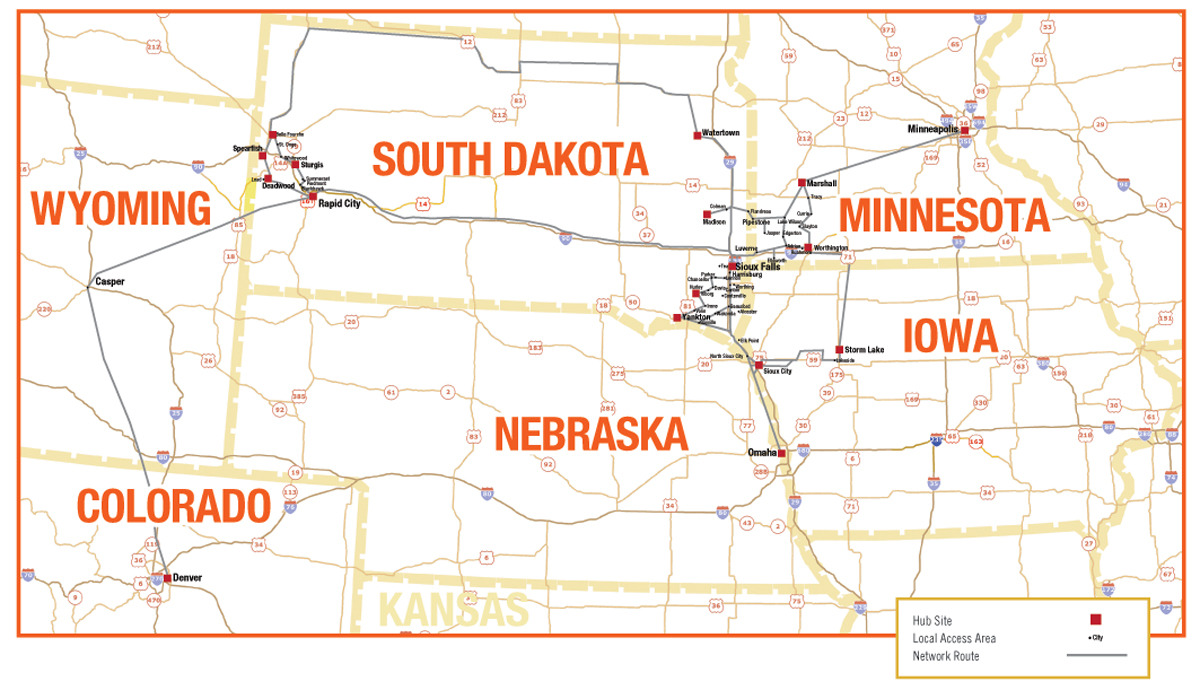
The Vast Fiber Network
Popular Articles
Business Internet Service FAQs
VAST Business Cable Modem service is consistently fast no matter where your business is located, whereas DSL service typically gets slower the farther your business is located from the telephone company’s central office. Accordingly, even if the local DSL provider advertises high speeds, these speeds may not be available in your area. Even if you are located in the heart of a DSL service area, it’s unlikely that your local DSL provider can offer the same peak download speed performance available from VAST Business.
Additional accounts are available by simply calling your local Business Account Manager or Business Support at 1-866-991-9722. If more storage space is required, VAST Business offers expanded storage options as well.
It’s very easy. Simply call your local Business Account Representative or our VAST Business Support Team at 1-866-991-9722. Often upgrades can be handled over the telephone and can be completed in 24 hours.
A simple reboot of the modem, computer and router can sometimes fix this issue. Unplug the power to the modem and computer. If you have a router, unplug the power to the router also. After unplugging the power to these components wait one minute then restore power to the individual components. Restart your computer. If this doesn’t resolve the issue, call VAST Business Support at 1-866-991-9722.
Static IP does not change when you log onto your VAST Business modem, whereas a Dynamic IP may change between sessions. A Static IP is a numeric, fixed Internet Protocol address always associated with your computer.
Dynamic IP is a numeric Internet Protocol (IP) address that is temporarily assigned to your computer or modem only for a specified duration. A Dynamic IP often changes on your computer between Internet sessions as opposed to a Static IP that does not change.
Dynamic IP is the default IP setting on most computers, making network configurations simpler. Additionally, if outside users do not need to access your network, a Dynamic IP will likely satisfy your business’ needs.
Yes, the choice is yours. VAST Business provides a Dynamic IP address or a Static IP with Internet service. A Dynamic IP address will be assigned unless you request a Static IP address.
We deliver quality service and closely monitor our network to ensure maximum performance. However, the consistent delivery of speed varies based on many factors, including customer specific equipment configurations, potential network congestion during peak loads and Internet activity beyond the VAST Business network. Therefore, actual customer speeds may vary and cannot be guaranteed.
All connections to the Internet are shared at some point. Since all connections are shared, providing a high speed Internet experience depends on your ISP’s network capacity, scalability, and overall architecture. Our network, locally, and our gateway to the Internet are designed to be highly scalable, providing increased network capabilities as demand increases.
As many as you need. VAST Business provides the cable modem and you can network as many work stations as needed by connecting the modem to a router. We would be happy to recommend local companies that sell and service routers.
File Transfer Protocol. This is an application-layer protocol that allows a user to transfer files from his/her own computer to another computer using a 3rd-party FTP Client.
An email application is 3rd-party software that allows one to send and receive email from their desktop instead of using a Web-based mail utility. Examples of email applications are as follows: Outlook, Outlook Express, Mozilla Thunderbird, and Eudora.
An Ethernet cable, more commonly known as CAT-5 cable, is high-signal integrity cabling known for its speed capabilities of 100Mbit/s. This is typically the type of cable that connects a Cable/DSL modem to your computer or to your router.
Spyware is software that’s intended to take partial control of ones computer system, usually for the benefit of a 3rd-Party. This software typically is used to monitor a users web-browsing for marketing purposes, redirect a user to an advertisement site, or theft of personal information.
A firewall is a piece of hardware or software that helps protect computers and other devices in a network from outside access and threats. Designed for a network Firewalls environment to monitor, allow/deny, and log inbound and outbound activity according to the security policy configured for the firewall. Depending on the number of users in your business, the type of firewall you need will vary.